Updated May 28, 2026 - 6 months after Pocket shut down

The Pocket alternative built for how people actually save things in 2026.

Pocket shut down on July 8, 2025. Most of the alternatives people are pointing to are still article-shaped, built for a 2007 internet. Here are the 9 best options in 2026 - honestly compared, including the one we built.

Quick answer

The closest 1:1 Pocket replacement is Raindrop.io (free, mature, browser-first). The best fit for the modern multi-source saving habit (WhatsApp forwards, screenshots, TikToks, articles in one place) is MarkIt - the only option with WhatsApp and Telegram bot capture. For pure article reading with highlights, Readwise Reader wins. Detailed comparison and 6 more options below.

Why Pocket shut down - and what you actually lost

Mozilla announced Pocket's shutdown in May 2025 and pulled the plug on July 8, 2025. The official reason was a strategic refocus on Firefox; the real reason, by most external readings, was declining usage and the cost of maintaining a free product that never converted enough Premium subscribers.

If you used Pocket, you can still export your library from Mozilla's archive page. That export is a CSV with URLs, titles, and tags. The "Permanent Library" feature - which kept a snapshot of every article even after the original was deleted from the web - did not survive the export.

For most users, what they lost is not really the URLs. It is the habit. Pocket was the place to put a link you'd see again. After 15+ years, that muscle memory is gone, and the question now is which tool earns it next.

What "save for later" actually means in 2026

Pocket was built in 2007, when "save for later" meant a long article from a blog. That world is mostly gone. The 2026 saving habit is messier:

  • The link your friend forwarded to you in WhatsApp.
  • The TikTok of a recipe you'll never find again unless you save it.
  • The Instagram post with the apartment listing.
  • The screenshot of the meeting agenda before it disappears from Slack.
  • The PDF of the lease your landlord sent.
  • The LinkedIn post from a recruiter you'll want to follow up on.
  • And, yes, still: the longform article from The New Yorker.

Most apps on this list still treat all of that as a URL. They save the link, ignore the image inside it, can't open the TikTok, and assume you wanted to read an article. That mismatch is why a typical "save for later" user ends up with screenshots in their camera roll, links in WhatsApp self-messages, articles in a bookmarks folder, and PDFs in their email - eight places, none of which they ever search.

The tool that earns the Pocket habit next is the one that absorbs all eight inputs into one searchable place, automatically. That's the lens this comparison uses.

The full comparison

Nine alternatives, scored on what matters for the 2026 saving habit - not just article reading. MarkIt is ours; we've called out where we're the right fit and where we're not.

AppFreeMulti-sourceWhatsApp/
Telegram bot
AI semantic
search
OCR on
screenshots
Pocket
import
Best for
MarkIt(ours)FreeManualPeople who save things in WhatsApp, Instagram, and screenshots, not just articles.
Raindrop.ioFreeBrowser-first power users who organize by folders and collections.
InstapaperLimitedPeople who read 5+ longform articles per week and want a clean reading experience.
Readwise ReaderLimitedHeavy readers who highlight, annotate, and want to review what they read.
MatterLimitedNewsletter readers who like text-to-speech and a social discovery layer.
MymindPaid onlyManualDesigners and visual thinkers who want zero folders and a calm UI.
GoodLinksPaid onlyiPhone-and-Mac users who hate subscriptions.
WallabagFreePrivacy maximalists who want to run their own server.
SortiFreeMobile-only users who save Instagram and TikTok posts from their phone and never use a desktop browser to save things.

Pricing changes constantly across this category. Verify current rates on each app's homepage before subscribing. Last verified May 28, 2026.

The 9 alternatives, reviewed

Ranked by fit for the 2026 saving habit. We start with MarkIt (ours) so the disclosure is up front, then the alternatives in order of community recommendation.

1. MarkIt(that's us)

mark-it.co

Save the link, the screenshot, the TikTok. Find it in two seconds.

Best for: People who save things in WhatsApp, Instagram, and screenshots, not just articles.
Pricing: Free up to 40 saves/month. Pro is in early access.

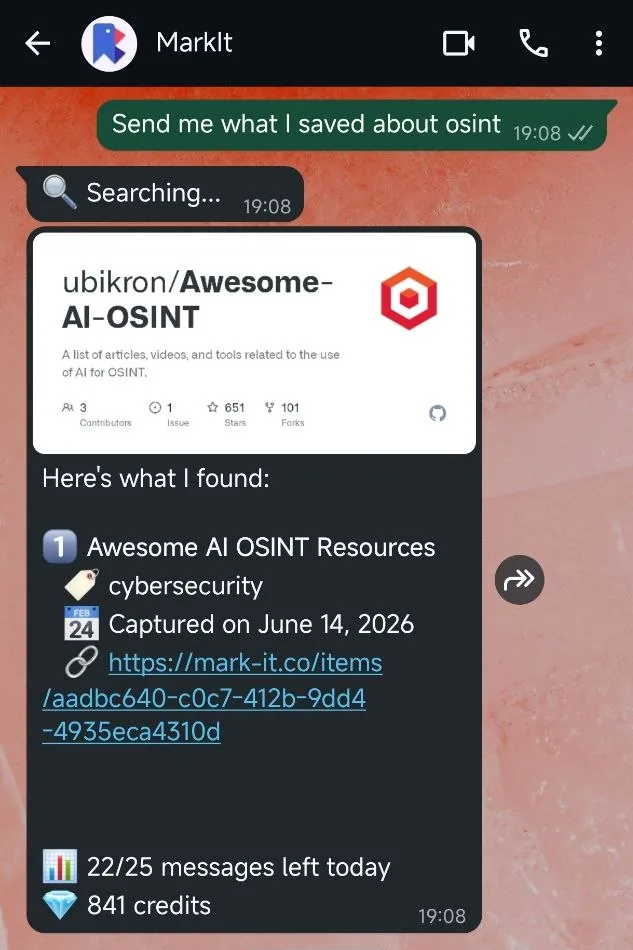
MarkIt is the one we built, so this needs the honest disclosure: we're going to be the best fit for some people and a bad fit for others. Here's the honest split. MarkIt is the only tool on this list with a real WhatsApp bot and a real Telegram bot. You forward a message, a link, a screenshot, a TikTok, an Instagram post, a LinkedIn article, a YouTube video, or a PDF straight to the bot, and it lands in your library with the title, tags, and a summary already filled in. That matters more than it sounds. The way most people actually save things in 2026 is "send to myself on WhatsApp" - and then never look at that thread again. MarkIt is built for that habit. It also accepts screenshots with OCR (so the text inside the screenshot is searchable later), Instagram and TikTok shares from your phone's native share sheet, PDFs, YouTube videos with full transcripts, and the regular paste-a-URL flow. AI auto-categorizes everything into 12 topic buckets (Recipes, Finance, Work, etc.), generates tags, and writes a one-line summary so old saves are not opaque. Search is semantic, not keyword-only. "That pasta recipe from last week" returns the right item even when the title says nothing about pasta. Where MarkIt is not the right call: if all you save is articles and you want highlights, annotations, text-to-speech narration, and spaced-repetition review - that's Readwise Reader, not us. If you live entirely inside Apple and want a one-time-payment native app, GoodLinks beats us. If you want polished bookmark organization with collections-and-folders mental model, Raindrop is more mature there. We're newer than the rest of this list and the brand-new-tool taxes apply: smaller community, fewer integrations, fewer years of stability evidence. Worth knowing.

Pros
  • - WhatsApp + Telegram bot capture (no one else on this list has this)
  • - Multi-source: links, screenshots, Instagram, TikTok, LinkedIn, X, Reddit, YouTube (with transcripts), PDFs, articles
  • - Semantic search ("the recipe with mushrooms") - not just keyword match
  • - OCR on every image so screenshot text is searchable
  • - AI auto-categorization with no setup or manual folders
  • - Genuinely free tier (40 saves/month, all AI features included)
Cons
  • - Newer product, smaller community than Raindrop/Instapaper
  • - No native iOS or Android app yet (PWA only)
  • - No highlight/annotation layer for articles
  • - No spaced-repetition reading review
  • - Pro tier is in early access, not yet on Stripe self-serve

The 2026-shaped option. Built for messaging-app saving, not just article reading.

2. Raindrop.io

raindrop.io

Polished bookmark manager with reader mode.

Best for: Browser-first power users who organize by folders and collections.
Pricing: Free unlimited bookmarks. Pro $3/mo for full text search and nested collections.

Raindrop is the app most Reddit threads about Pocket alternatives end up recommending, and for good reason. It has been around since 2013, the apps on every platform are mature, the browser extension works well, and the free tier is genuinely useful (unlimited bookmarks, basic search, multiple devices). It's also the closest thing to a 1:1 Pocket replacement for people whose saving habit is articles-and-the-occasional-tweet. Pocket import is one click. Reader mode is clean. Collections-and-tags model is what bookmark-manager users expect. Where it falls short for the 2026 saving habit: Raindrop is fundamentally a URL bookmark manager. Forwarding a WhatsApp screenshot does not work. Saving a TikTok or Instagram Reel pulls a thumbnail and a URL, not the actual content. There's no OCR on images, no AI summaries on long articles, no semantic search. If you want to find a saved item by its meaning rather than its title, you cannot. Pricing is the cheapest paid tier on this list at $3/mo, but the free tier is good enough that most users never upgrade. Verdict: if your saving habit is "links I want to read later, organized by folders," Raindrop is the winner on this list. If your saving habit is the modern messy multi-source thing, you will outgrow it within a month.

Pros
  • - Unlimited free bookmarks
  • - Mature apps on every platform
  • - One-click Pocket import
  • - Cheapest paid tier ($3/mo)
  • - Collections + tags + nested folders
Cons
  • - No WhatsApp/Telegram capture
  • - No real multi-source - URL bookmark manager at heart
  • - No OCR on saved images
  • - Keyword search only (no semantic)
  • - No AI summaries or auto-categorization

The community default for ex-Pocket users. Strong if you want folders.

3. Instapaper

instapaper.com

The cleanest article reader, since 2008.

Best for: People who read 5+ longform articles per week and want a clean reading experience.
Pricing: Free tier. Premium $5.99/mo or $59.99/yr.

Instapaper is the original "read it later" app and it is still the cleanest article-reading experience on this list. Typography is the best, the Kindle integration is the best, the iOS app is the best for actual reading. If you read longform on a daily basis and want a tool that respects the article, Instapaper is hard to beat. Premium ($5.99/mo or $59.99/yr) unlocks full-text search, the permanent archive, the PDF reader, unlimited notes, Kindle integration, AI voices for text-to-speech, and 3x speed reading. The free tier still lets you save unlimited content with cross-device sync and folders, but loses search and archive permanence - which surprises new switchers expecting Pocket-tier generosity. What Instapaper does not do: anything outside articles. No WhatsApp bot, no screenshot capture, no TikToks, no PDFs as first-class objects, no OCR, no AI. It is intentionally a focused tool, and that focus is its strength and its limit. Pocket import is supported. If you exported your Pocket archive in 2025 and you mostly saved articles, Instapaper is the most faithful translation of the Pocket experience.

Pros
  • - Best reading typography on this list
  • - Mature Kindle/e-reader integration
  • - iOS app is excellent
  • - Free Pocket import
  • - Has been around since 2008 (longevity signal)
Cons
  • - Free tier is tighter than people expect
  • - Articles only - no screenshots, no social-post saves, no document upload
  • - No WhatsApp/Telegram capture
  • - No AI features
  • - No semantic search

The article-purist option. Best reading UI on this list. Nothing else.

4. Readwise Reader

readwise.io

Power-user reading hub with highlights and spaced repetition.

Best for: Heavy readers who highlight, annotate, and want to review what they read.
Pricing: $9.99/mo billed annually or $12.99/mo billed monthly. 30-day free trial. Bundled with the Readwise Full plan (Reader is not sold standalone).

Readwise Reader is the most feature-loaded option on this list. It handles articles, RSS feeds, newsletters delivered to a dedicated email address, YouTube videos with transcripts, PDFs, EPUBs, and tweets. Highlights sync to Readwise (the parent product) for spaced-repetition review, which is genuinely useful if you actually want to remember what you read. It also has an AI feature called Ghostreader that can summarize an article, define a term, or generate quiz questions from your highlights. The AI is good. Pricing is bundled - Reader only ships as part of the Readwise Full plan ($9.99/mo billed annually, or $12.99/mo on the monthly plan). There is a 30-day free trial. There is no Reader-only tier and no permanent free option. The honest gap: Reader is built for the person who treats reading as study. If you save things to remember them, highlight them, review them, and integrate them into a notes system (Obsidian, Notion, etc.), Reader is unmatched. If you save things to find them again later when you need them, Reader is overkill and the ~$120/year is hard to justify. No WhatsApp/Telegram capture, no screenshot OCR, no native social-media share (though you can forward newsletters via email-to-Reader). Article-shaped, like most of this list.

Pros
  • - Best feature depth of any tool here
  • - Highlights + spaced repetition for actual learning
  • - AI summaries and explanations (Ghostreader)
  • - Email-to-Reader for newsletters
  • - Semantic search across your library
  • - 30-day free trial to test the full product
Cons
  • - No permanent free tier - $9.99/mo billed annually after trial
  • - Bundled with Readwise Full; no Reader-only plan
  • - Steep learning curve
  • - No WhatsApp/Telegram capture
  • - No screenshot OCR
  • - Overkill for casual saving

The most powerful reading tool on this list. Also the most expensive.

Social reading with newsletter discovery and TTS.

Best for: Newsletter readers who like text-to-speech and a social discovery layer.
Pricing: Free with limits. Premium $7.99/mo or $79.99/yr.

Matter is the only tool on this list with a serious focus on newsletter parsing and text-to-speech. If your reading habit is "I subscribe to 20 Substacks and have inbox-anxiety about them," Matter routes them out of your inbox into a clean reader and offers high-quality TTS so you can listen on a commute. It also has a social layer where you can see what people you follow are reading and highlighting. Some users love this; others find it a distraction from the actual reading. The free tier is workable but the better features (unlimited saves, AI summaries, library organization) are behind the $7.99/mo paywall. App Store reviews show users complaining about the price/feature ratio at this tier - the value lives mostly in the TTS quality. Same article-shaped limitation as the rest of this list. No WhatsApp bot, no screenshot OCR, no semantic search across mixed media. Pocket import supported.

Pros
  • - Best text-to-speech on this list
  • - Newsletter inbox replacement
  • - Social discovery layer
  • - iOS app polish
  • - Pocket import
Cons
  • - Best features locked behind $7.99/mo paywall
  • - iOS-leaning (weaker on Android)
  • - No WhatsApp/Telegram capture
  • - No screenshot OCR
  • - Social layer is divisive

Strong if you read newsletters and want to listen to articles.

6. Mymind

mymind.com

Beautiful AI-organized visual bookmarks.

Best for: Designers and visual thinkers who want zero folders and a calm UI.
Pricing: No free tier. Bookmarker $4.99/mo (no AI). Student of Life $7.99/mo or $79/yr (AI included). Mastermind $12.99/mo or $129/yr (full feature set).

Mymind made "AI organizes your saves so you don't have to" a category before MarkIt existed, and the product is genuinely beautiful. The visual library, the way images and quotes and articles all sit side-by-side without folder anxiety, the calm typography - it is the most thoughtfully designed app on this list. What Mymind sells well: it auto-tags. It has OCR. It has good semantic search. It pulls clean previews from URLs. If you saw the Mymind marketing and thought 'that's MarkIt for design people' - that's a fair read. Pricing is tiered: a $4.99/mo Bookmarker tier without AI, then $7.99/mo (Student of Life, AI included), then $12.99/mo (Mastermind, full features). No free tier - you have to commit to find out if the aesthetic clicks for you. Where the structural gaps are: no WhatsApp/Telegram capture (the wedge MarkIt owns), and no real native mobile app for capture from messaging contexts. Mymind also leans toward visual saves - images, quotes, single-screen ideas. It is less strong for longform article reading than Instapaper or Readwise. Pick Mymind if the aesthetic and the auto-organization speak to you. Pick MarkIt if you save from WhatsApp/Telegram more than from a browser.

Pros
  • - Most beautiful UI on this list
  • - AI auto-tagging and OCR
  • - Semantic search
  • - Calm, folder-free organization
  • - Strong for visual saves and quotes
  • - Tiered pricing starts at $4.99/mo
Cons
  • - No free tier at all
  • - No WhatsApp/Telegram capture
  • - No native mobile capture story
  • - Weaker for longform article reading
  • - Pocket import is manual

The aesthetic option. Beautiful, but no free tier and articles-leaning.

8. Wallabag

wallabag.org

Open-source self-hosted read-later.

Best for: Privacy maximalists who want to run their own server.
Pricing: Free if you self-host. €11/yr for hosted Wallabag.it service.

Wallabag is the open-source answer to Pocket. The code is on GitHub, the data lives on your own server, and the project has been maintained continuously since 2013. If your primary criterion is 'I want my saves to outlive any company and I trust myself to run a server,' Wallabag is the answer. Wallabag.it offers a hosted version at €11/year if you don't want to self-host. The hosted service is functional but the UI is dated compared to the polished commercial alternatives. The honest gap: setup friction is real if you self-host (Docker, PHP, database, reverse proxy, certificates). The interface looks like 2015. There is no AI, no semantic search, no OCR, no multi-source capture, no WhatsApp/Telegram. It is intentionally a focused tool. Verdict: pick Wallabag if your privacy posture is non-negotiable and you have or want sysadmin skills. Otherwise the commercial options on this list will serve you better.

Pros
  • - Fully open source
  • - Self-hostable - your data, your server
  • - Maintained since 2013
  • - Pocket import
  • - Hosted version available at €11/yr
Cons
  • - Setup friction if self-hosting
  • - Dated UI
  • - No AI features
  • - Articles only
  • - No mobile capture beyond a basic share extension

The self-host pick. Maximum control, real setup friction.

Everything you save, exactly when you need it.

Best for: Mobile-only users who save Instagram and TikTok posts from their phone and never use a desktop browser to save things.
Pricing: Free. No subscription, no premium tier, no ads.

Sorti (letitsorti.com) shares MarkIt's core thesis: links, screenshots, Instagram/TikTok posts, recipes, PDFs - all in one AI-organized library. They market themselves as "Pinterest meets Notion, but fully automatic." The product is genuinely polished and the free tier is generous (no subscription, no premium upsell). If you only save from your phone, they are a real option. Where MarkIt is the better fit for most people, having tried both: (1) Capture path. Sorti requires opening the Sorti app or using the share sheet from another app. MarkIt has a WhatsApp bot and a Telegram bot - you save inside the conversation you are already having, which is where 80% of "send to myself" saves happen. That is a fundamentally different saving habit, and the one most modern users actually have. (2) Where you use it. Sorti is iOS + Android only. No web app, no Chrome extension, no desktop. If you save from a browser at your laptop, you cannot. MarkIt has a web dashboard, a Chrome extension, and works as a PWA on both mobile platforms. (3) Search and recall. Both have AI semantic search and OCR. MarkIt also supports natural-language search from inside the WhatsApp/Telegram chat itself ("find that recipe Sara sent") - no app switch. (4) Multilingual. MarkIt supports English and Hebrew AI categorization and search today, with more languages on the roadmap. Sorti does not publicly document language support. Where Sorti is genuinely strong and worth knowing: native mobile apps (MarkIt is currently a PWA), price-tracking on saved products, and dedicated recipe extraction features. If price-tracking on shopping links is important to you, Sorti has it and MarkIt does not yet. Verdict: Sorti is a real product and the team has executed well. If your saving habit is entirely mobile and the only place you save from is the iOS/Android share sheet, Sorti is a reasonable choice. For the much more common 2026 habit - saving things in WhatsApp and Telegram threads, plus a mix of phone and laptop - MarkIt is built for that habit and Sorti is not.

Pros
  • - Genuinely free (no subscription, no premium tier, no ads)
  • - Native iOS + Android apps
  • - AI auto-tagging, semantic search, OCR
  • - Polished visual library UI
  • - Built-in price tracking on shopping links
  • - Recipe extraction
Cons
  • - No WhatsApp bot, no Telegram bot - cannot capture inside a chat
  • - No web app or desktop client at all
  • - No Chrome extension
  • - No Pocket import
  • - No documented multilingual support

Closest in thesis (multi-source AI library), but iOS+Android only and no messaging-app capture.

Frequently asked questions

Mozilla shut Pocket down on July 8, 2025 as part of a strategic refocus. They cited declining usage and the cost of maintaining a non-core product. The official archive is at support.mozilla.org/en-US/kb/future-of-pocket, where you can also export your full Pocket library.

Direct one-click import is on the roadmap. Today the workflow is: export your Pocket library as CSV from Mozilla's archive page, then forward the URLs to the MarkIt WhatsApp or Telegram bot in batches of 10-20 at a time. The bot will save each one. A guided import flow that handles this automatically is coming.

Genuinely free, not a trial. 40 captures per month, 12 categories, all AI features (auto-categorization, semantic search, OCR, summaries), and all capture methods (WhatsApp bot, Telegram bot, Chrome extension, iOS/Android share, web). MarkIt makes money from Pro-tier users who hit the 40-per-month ceiling and want more.

Those tools save articles. MarkIt saves anything - screenshots, TikToks, Instagram posts, LinkedIn articles, YouTube videos (with full transcripts), WhatsApp forwards, PDFs, and articles. The wedge is the WhatsApp/Telegram bot: you save inside the conversation, not by opening another app. AI organizes everything automatically and learns from how you move items between categories. Search is semantic rather than keyword-only.

Not yet. MarkIt is a PWA (Progressive Web App), which installs to your home screen and behaves like a native app but ships through the browser. Native apps are on the roadmap. The good news is the WhatsApp and Telegram bots work perfectly without any app installed - you save inside your existing chat apps.

Your data stays yours. Full export available anytime, on request, in JSON plus the original media files. After watching Pocket users lose their libraries in 2025, MarkIt was built with portability from day one. Contact [email protected] for an export.

No. MarkIt does not train models on user content. AI runs server-side only to categorize, tag, summarize, and search your library. OpenAI processes captures under their standard API terms (30-day retention for abuse monitoring, then deleted). MarkIt does not sell data, does not show ads, and does not track users across the web.

Forward any message - link, screenshot, photo, forwarded text, social post, PDF - to the MarkIt WhatsApp number. The bot saves it to your library, fills in the title and tags, writes a summary, and confirms within five seconds. You can also ask the bot natural-language questions like 'Find that recipe Sara sent me' and it returns the matching saves with previews. Bot setup takes about 30 seconds inside MarkIt's settings.

The WhatsApp-native option

Save your first link in 30 seconds.

Free up to 40 saves a month. Includes the WhatsApp bot, Telegram bot, Chrome extension, semantic search, and screenshot OCR. No credit card.

Start free

Coming from Pocket? See how MarkIt works in 3 steps, or compare Free and Pro.